Core Web Vitals in 2026: A Practical Fix List for Slow Indian Business Websites
Why your site feels fast on a laptop and slow on a customer's phone
The gap between how a site performs on the laptop that built it and how it performs on a customer's phone is the single most common finding in audits. On fibre broadband with a warm cache, almost anything feels instant. On a mid-range Android phone on 4G in a basement shop, the same page can take six seconds to show anything readable.
Core Web Vitals measure the second experience, not the first, which is why they correlate with business outcomes. They are also the part of technical SEO a business owner can actually verify with a free tool.
The current set is three metrics: LCP measures how long until the main content appears, INP measures how quickly the page responds to a tap, and CLS measures how much the layout jumps around while loading. Google treats all three as page-experience signals, and beyond SEO they map directly to whether a visitor bothers to call you.
The five causes behind almost every slow Indian business site
After auditing a number of clinic, manufacturer and services sites, the causes repeat with grim regularity. Nearly all of them are structural choices made at build time, not things you can tune away afterwards.
That matters because it tells you where to spend. Adding a caching plugin to a site that loads a 4 MB hero image and four tracking scripts is rearranging deckchairs.
- An unpaid-for hero image — 2 to 5 MB JPEG served at full camera resolution to a 390 px screen
- Four or more third-party scripts loaded before the content renders: chat widget, two pixels, a heatmap, a font loader
- A page builder or theme loading three copies of a slider library it does not use
- Fonts loaded from an external CDN with no preconnect, blocking text rendering
- No server-side rendering, so the visitor waits for JavaScript to fetch data before seeing a headline
Fixing LCP: the hero image is usually the whole story
Largest Contentful Paint is dominated by whatever hero element sits above the fold. In Indian SMB sites that is nearly always a large photograph of a clinic interior, a factory floor, or a stock image of people in a meeting.
The fix is not compression alone — it is serving the right size in the right format at the right priority. A modern phone does not need a 2560-pixel-wide image, and it can decode WebP or AVIF at a fraction of the bytes.
Just as important: tell the browser that this image matters. Without a preload hint and a high fetch priority, the browser may download your chat widget before the image the visitor is actually waiting for.
- Serve the hero at roughly 2× the largest display width — usually 1600 px wide is plenty
- Convert to WebP or AVIF; a properly encoded 1600 px hero should land under 150 KB
- Add fetchpriority="high" and a preload link for the hero only, never for every image
- Remove lazy-loading from the hero; lazy-loading an above-the-fold image delays it
- Set explicit width and height attributes so the browser reserves the space immediately
Fixing INP: the problem is usually JavaScript you forgot about
Interaction to Next Paint replaced First Input Delay because FID could be gamed by loading a fast handler. INP measures the whole interaction — every tap, every keypress — and it punishes pages that keep the main thread busy.
The usual culprits are chat widgets, animation libraries and analytics suites that each attach their own listeners and timers. A single honest audit step is opening DevTools, disabling JavaScript, and loading the page: whatever disappears that you did not need was probably costing you INP.
For most business sites the answer is fewer scripts, deferred until after interaction. Widgets can load on first scroll or on a short timeout; nothing above the fold should depend on them.
Fixing CLS: reserve space for everything
Layout shift is the easiest of the three to fix and the most embarrassing to explain. It is almost always caused by content arriving without reserved space: images without dimensions, ads and banners injected above the fold, cookie bars pushing the page down, or a web font swapping with a different metric.
The fix is mechanical. Every image gets width and height. Every late-injected banner gets a fixed-height slot reserved in the markup. Web fonts load with font-display: swap and a fallback whose metrics are close, or the text uses a system font stack that never shifts.
A layout shift on mobile is worse than on desktop because the target the visitor is about to tap moves away from their thumb. That is also why CLS shows up as a lead-quality problem, not just a technical score.
The order to fix things in
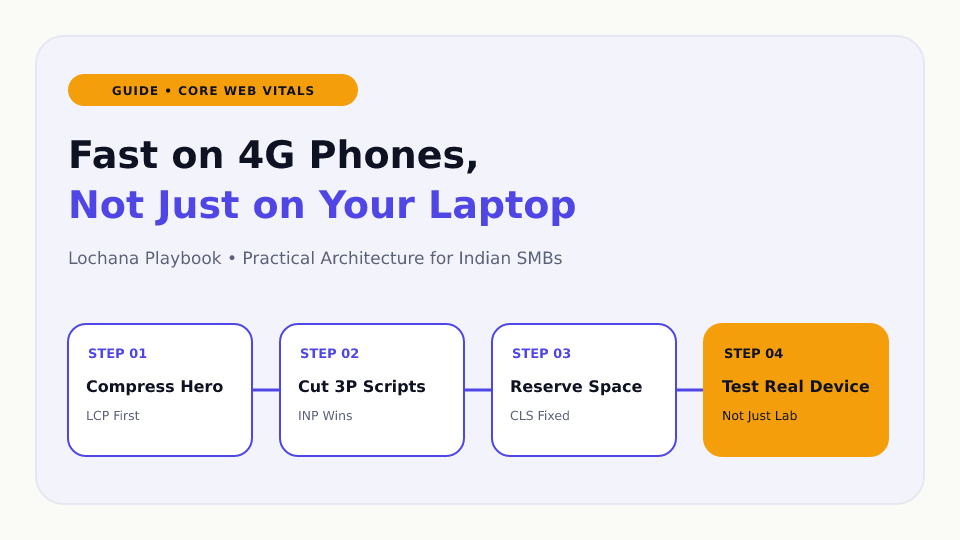
Do not start by installing a performance plugin. Start by looking at what the browser actually downloads, in order, on a throttled connection. The ordering below gets most Indian business sites from failing to passing without an expensive rebuild.
Test on a real mid-range Android phone if you have one. Lighthouse with simulated 4G is a decent proxy, but nothing beats watching a real device on a real network while a developer watches the network tab.
- 1. Compress and correctly size the hero image, and preload it
- 2. Delete third-party scripts nobody uses; defer the rest
- 3. Set explicit dimensions on every image and iframe
- 4. Self-host or preconnect your fonts, and use font-display: swap
- 5. Remove unused CSS and JavaScript from the theme or page builder
- 6. Server-render or pre-render the content so the headline is in the HTML
- 7. Only now consider a CDN, and check it serves from an Indian edge location
Why Indian hosting choices show up in these numbers
A site hosted only in Frankfurt adds meaningful round-trip time for every visitor in Mumbai, Delhi or Bengaluru before a single byte of content is useful. Modern CDNs mostly solve this, but only if the edge response is actually cached in India rather than proxied back to Europe.
Check it directly: run the URL through a global speed test and look at the Indian locations specifically, not the global average. A 1.2 second global average with a 4 second Mumbai figure is a caching configuration problem, not a code problem.
Server-side rendering pulls in the same direction. If the HTML arrives with the headline and the hero already in place, the visitor has something to read in the first round trip regardless of what the JavaScript does afterwards.
Want help setting this up for your business?
Book a free audit with Lochana and get a clear, fixed-price plan tailored to your team.